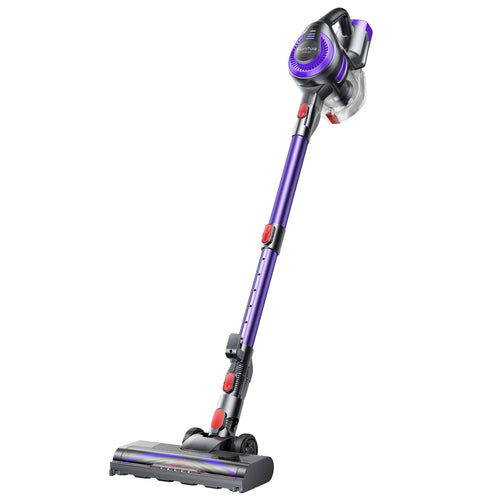
Besides common issues like weak suction and hair tangling, you may have also experienced blockages or error messages while using your vacuum cleaner. Don’t worry! We’ve put together a list of common causes for vacuum blockages, along with troubleshooting tips and daily maintenance advice.

1. Common Causes of Vacuum Cleaner Clogs
- Clogged Hose
Debris can get stuck in the vacuum hose for several reasons. Larger items like paper or small toys may be too big to pass through the hose, causing a blockage. Smaller debris, such as dust or pet hair, can accumulate over time, especially in areas where the hose may be kinked or twisted, restricting airflow. Wet or sticky substances can also cling to the hose walls, making it easier for debris to get trapped. Additionally, cracks or holes in the hose can catch smaller particles, while a buildup of dirt or dust can reduce suction power, further contributing to clogs.
When the suction power noticeably weakens or strange noises are heard, it may indicate a hose blockage.
- Full Dust Bag or Bin
When the dust bag or canister becomes full, the vacuum’s suction power is significantly reduced. This happens because as the bag or canister fills up with debris, it limits the airflow, making it harder for the vacuum to pull in more dirt. A full dust cup creates more resistance, which can reduce the overall suction efficiency. It’s important to empty the dust canister when it's full to maintain optimal suction performance.
Typically, vacuum cleaners of different models and brands have varying dust canister capacities, and there is a recommended maximum capacity for emptying. Please refer to the product manual for details. For example, the Honiture P7 Pro has a recommended maximum line for emptying the dust canister at this point.

- Clogged Filters
Filters, such as HEPA or foam filters, are designed to trap dust, dirt, and allergens from the air as the vacuum cleaner operates. Over time, as more dust and debris accumulate in the filter, it can become clogged. When this happens, the filter's ability to capture particles is reduced, and airflow is restricted. A clogged filter can significantly lower the vacuum’s suction power and overall performance.
- Jammed Brush Roll
Hair and debris wrapping around the brush roll is a common issue that can lead to vacuum cleaner clogs. As the brush roll spins, it is designed to agitate and lift dirt and debris from the floor. However, long hair, fibers, and larger pieces of debris can become tangled around the brush. Over time, this buildup can restrict the brush roll's movement, reduce suction power, and cause blockages in the vacuum hose. The tangled debris can also prevent the brush from effectively cleaning surfaces, making the vacuum less efficient and potentially leading to further clogs in the system.
2. How to Fix a Clogged Vacuum Cleaner
When your cordless vacuum says it's blocked, it typically means that there is some kind of obstruction preventing airflow or the suction from working properly. Here's a step-by-step guide to help you troubleshoot and resolve the issue:
1. Turn Off and Disconnect the Vacuum
Make sure the vacuum is turned off and the battery is removed (if possible) before you start inspecting it.
2. Inspect the Hose or Nozzle for Blockages
Disconnecting and check the hose or nozzle for any debris that may be clogging it.
Shine a flashlight into the hose to see if there’s a visible blockage. Use a long object like a broomstick or a cleaning brush to dislodge any blockages inside the hose.
3. Check the Brush Bar (Roller)
Use scissors or a special brush cleaning tool to remove any tangled hair or debris. Make sure the brush bar can rotate freely after you clean it.
4. Check the Filter and Clean It
Remove the filter (it’s usually washable). Clean it by gently rinsing it under cold water until all dirt and debris are removed. Allow it to dry completely (usually 24 hours) before reinserting it.
5. Examine the Suction Pathway
Remove the canister and check the pathway leading from the brush bar to the canister to make sure nothing is blocking it.
6. Check the Canister and Empty It
Empty the dust canister completely. Clean the inside of the canister with a damp cloth to remove fine dust that could be clogging it.
7. Check the Airflow System
Some cordless vacuums have a built-in indicator for airflow. If there’s an issue with the airflow, it could trigger the block warning. Check for any airflow obstructions or clogged areas, especially near the motor or exhaust vents.
8. Reset the Vacuum (If Applicable)
Some models have a reset feature for troubleshooting, which may help after you've cleared the blockages. Look in the user manual for specific instructions on how to reset your model.
9. Check for Motor Issues
If your vacuum is still showing a blockage after you've cleared all possible obstructions, there may be an issue with the motor or electrical components. If you suspect a motor issue or can't resolve the blockage, it may be best to contact customer support or take the vacuum to a service center.

3. Essential Vacuum Cleaner Maintenance Tips
1. Regularly Check and Clean Filters
Frequency of filter maintenance (depending on model and usage). Clean filters are essential for maintaining optimal suction power and improving air quality. They also prevent mold and bacteria growth, improve energy efficiency, and help the device perform consistently over time. Regularly cleaning or replacing the filter can contribute to a longer-lasting and more reliable system.
2. Inspect and Maintain the Hose and Attachments Regularly
How to ensure the hose is free from blockages.
Cleaning attachments and ensuring they function properly.
3. Keep the Brush Roll Clean
Regular brush roll cleaning is important to maintain suction power, prevent clogs, and ensure efficient cleaning, extending the lifespan of your vacuum and improving performance.
4. Check for Wear and Tear
Inspect belts, brushes, and hoses for signs of damage or wear. Replace parts before they fail to avoid system malfunctions, maintain optimal suction, and prevent expensive repairs.
5. Avoid Non-Vacuumable Items
Items like coins, large debris, or liquids should not be vacuumed as they can damage the motor, clog the system, and reduce the vacuum's efficiency and lifespan.
6. Store the Vacuum Properly
Proper storage can prevent unnecessary damage. Avoid damp environments, as moisture can cause the motor to rust or the battery to deteriorate. After cleaning the filter, make sure it is completely dry before reassembling it back into the vacuum cleaner. Avoid keeping the battery in a fully charged or fully discharged state for long periods. It is best to maintain the battery charge between 20% and 80%, and perform a full charge before storing it.
By following regular maintenance tips, including emptying the dustbin, cleaning the filters, and checking for any wear and tear, you can significantly extend the life of your vacuum and ensure its efficiency. Share your vacuum maintenance tips or experiences in the comments. Subscribing to the blog for more household maintenance tips.